Note: For the blog reader convenient I am showing latest 2 posts in my blog page so that the user may not use high data for a single page, search from the above search box for other valuable post.
Thanks for visiting my(our) page.
About 3-Tier Architecture in asp.net using C#
Introduction:
The 3-Tier architecture is a unified standard applied while developing an application. It will make the application more understandable, hence the modification of the application will be easier and also easy to maintain the consistency of the application.
Description:
The use of the 3-Tier architecture will make our application a consistent one , basically it contains
three layers,
1. Presentation layer:
It contains the user interface panel of the application.
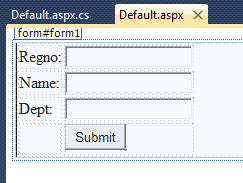
For my example I have created the UI panel as given below, it is like a sign up page.

2. Business Logic Layer
This layer will contain the business logics and other calculation and functionalities for the application we going to be created. For example in our application we going to be store the values we provide in the text boxes when the user click on save button, for that we create a function and passing the text box parameters like
string user = insertdata( staring username, string password, string email)
This functionality if required for other button also we have to write the same function again so to avoid this we create sub group in the Business Logic Layer where we keep the parameter value declaration once.
So, create or add item class.cs from the additem by right click on solution. After adding the class1.cs file in my example I am declaring the parameters using get and set method.
Note: you can rename anything for your class name while adding class1.cs


Our parameter declaration has finished now need to create business logic layer, now add a class as did above and here we need to apply the business logic in our business logic is to store the user input data to the database.
here this layer will be a mediator between application layer and data access layer (DataAppLayer).

As a mediator u need presentation layer as well as data access layer so in the above code I have placed some function call from the data access layer so before writing the above code u can add another class item and rename it as DataAccLayer.cs and write the code as below,
3 . Data Access Layer:

Here if you observe above functionality I am getting all the parameters by simply creating BELobjBELUserDetails. If we create one entity file we can access all parameters through out our project by simply creation of one object for that entity class based on this we can reduce redundancy of code and increase re usability

Thanks for visiting my(our) page.
About 3-Tier Architecture in asp.net using C#
Introduction:
The 3-Tier architecture is a unified standard applied while developing an application. It will make the application more understandable, hence the modification of the application will be easier and also easy to maintain the consistency of the application.
Description:
The use of the 3-Tier architecture will make our application a consistent one , basically it contains
three layers,
1. Presentation layer:
It contains the user interface panel of the application.
For my example I have created the UI panel as given below, it is like a sign up page.
2. Business Logic Layer
This layer will contain the business logics and other calculation and functionalities for the application we going to be created. For example in our application we going to be store the values we provide in the text boxes when the user click on save button, for that we create a function and passing the text box parameters like
string user = insertdata( staring username, string password, string email)
This functionality if required for other button also we have to write the same function again so to avoid this we create sub group in the Business Logic Layer where we keep the parameter value declaration once.
So, create or add item class.cs from the additem by right click on solution. After adding the class1.cs file in my example I am declaring the parameters using get and set method.
Note: you can rename anything for your class name while adding class1.cs
Our parameter declaration has finished now need to create business logic layer, now add a class as did above and here we need to apply the business logic in our business logic is to store the user input data to the database.
here this layer will be a mediator between application layer and data access layer (DataAppLayer).
As a mediator u need presentation layer as well as data access layer so in the above code I have placed some function call from the data access layer so before writing the above code u can add another class item and rename it as DataAccLayer.cs and write the code as below,
3 . Data Access Layer:
Here if you observe above functionality I am getting all the parameters by simply creating BELobjBELUserDetails. If we create one entity file we can access all parameters through out our project by simply creation of one object for that entity class based on this we can reduce redundancy of code and increase re usability
Here you will get one doubt that is why Class2.CS we can use this DataAcclayer.cs directly into our code behind we already discuss Business logic layer provide interface between DataAcclayer.cs and Application layer by using this we can maintain consistency to our application.
Now our Business Logic Layer is ready and our Data access layer is ready now how we can use this in our application layer write following code in your save button click like this
Here if you observe I am passing all parameters using this Class1(Entity Layer) and we are calling the method InsertUserDetails by using this Class2(Business Logic Layer). Now done>>>>>>>>>
Like my post thank you!!!